
Do Cell Phone Lockers Need Power or Internet to Work?
Whether a cell phone locker needs power or internet depends entirely on the level of security and functionality you require. Mechanical lockers require neither, while electronic and "smart" lockers need battery or hardwired power for locks and internet connectivity for remote management and tracking.
In this guide, you will learn:
- The difference between power for security and power for charging.
- How to choose between offline and internet-connected systems.
- The infrastructure requirements for Wi-Fi and Ethernet setups.
- How to avoid common installation pitfalls.
The Short Answer: It Depends on Your Goals
When selecting cell phone lockers, the infrastructure you need is dictated by the "brain" of the locker. If you only need a physical box to store a device, you can remain completely off-grid. If you need to manage access codes via a dashboard or provide high-speed charging, you will need to plan for electrical and data runs.
| Locker Type | Power Required? | Internet Required? | Best Use Case |
| Mechanical | No | No | Gyms, basic school storage |
| Battery-Electronic | Yes (AA/9V) | No | Staff rooms, secure R&D |
| Smart/Connected | Yes (110V-240V) | Yes (Wi-Fi/LAN) | Corporate offices, large campuses |
| Charging Station | Yes (Hardwired) | Optional | Public venues, airports |
Mechanical Lockers: Zero Power, Zero Internet
Mechanical lockers are the traditional "off-grid" solution. These use physical keys, combination dials, or coin-return locks. Because there are no electronic components, they are the most cost-effective to install and maintain.
Benefits of Off-Grid Storage:
- Zero Utility Costs: No increase in your monthly electric bill.
- Total Reliability: They work during power outages and internet downtime.
- Simple Installation: You can install phone lockers anywhere with a flat surface without worrying about proximity to wall outlets.
Common mistakes to avoid:
- Assuming mechanical lockers can be "upgraded" to charging lockers later (most cannot be retrofitted easily).
- Forgetting that physical key management can be a hidden administrative labor cost.
Electronic & Smart Lockers: Power for the Lock vs. Power for Charging
Many buyers confuse "electronic locks" with "charging lockers." It is possible to have a locker that needs power to unlock but provides no power to the phone itself.
Battery-Powered Electronic Locks (The "Middle Ground")
These units use digital keypads or RFID scanners powered by internal batteries (usually AA or 9V).
- Infrastructure: No wiring is required.
- Maintenance: Batteries typically last 12–18 months (needs verification) based on usage.
- Security: Most include a mechanical override key or a jump-start port if the battery dies while a phone is locked inside.
Hardwired Smart Lockers (The "Connected" Choice)
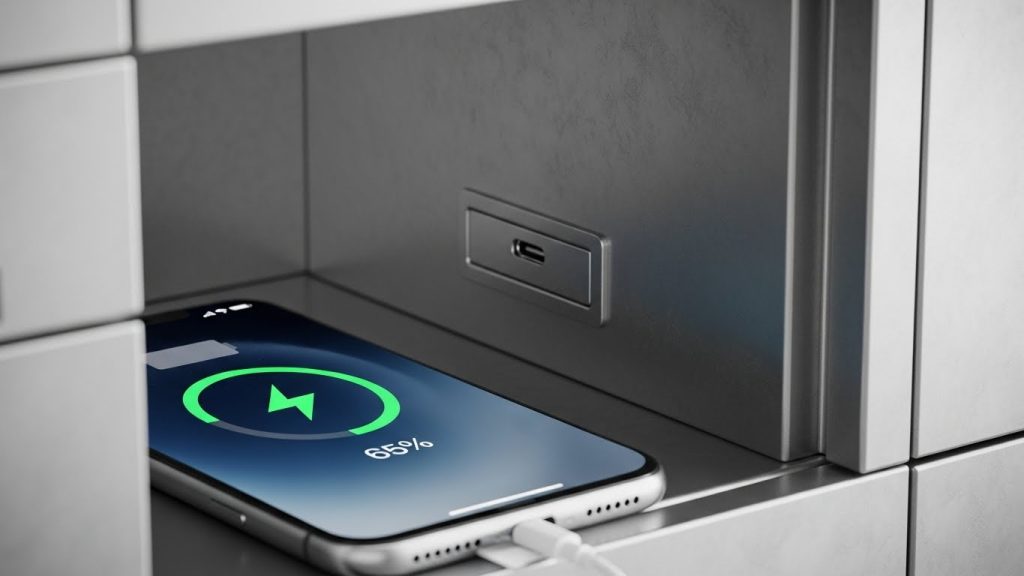
If your goal is to provide charging, you need hardwired power. In 2026, the standard for high-end facilities is USB-C Power Delivery (PD) 3.1, which allows for much faster charging than older USB-A ports.
- Electrical Specs: Most units plug into a standard 110V or 220V outlet. However, if you are installing a bank of 40+ lockers, the cumulative amperage can trip a standard circuit breaker.
- Capacity Note: When planning your layout, consider how many phones a phone locker can hold to ensure your electrical circuit can handle the maximum potential load.
Common mistakes to avoid:
- Using "daisy-chain" power strips to power multiple locker banks; this is a fire hazard and often violates building codes.
- Overlooking the heat generated by dozens of phones charging in a confined space.
Do You Need Internet? (Wi-Fi vs. Offline Management)
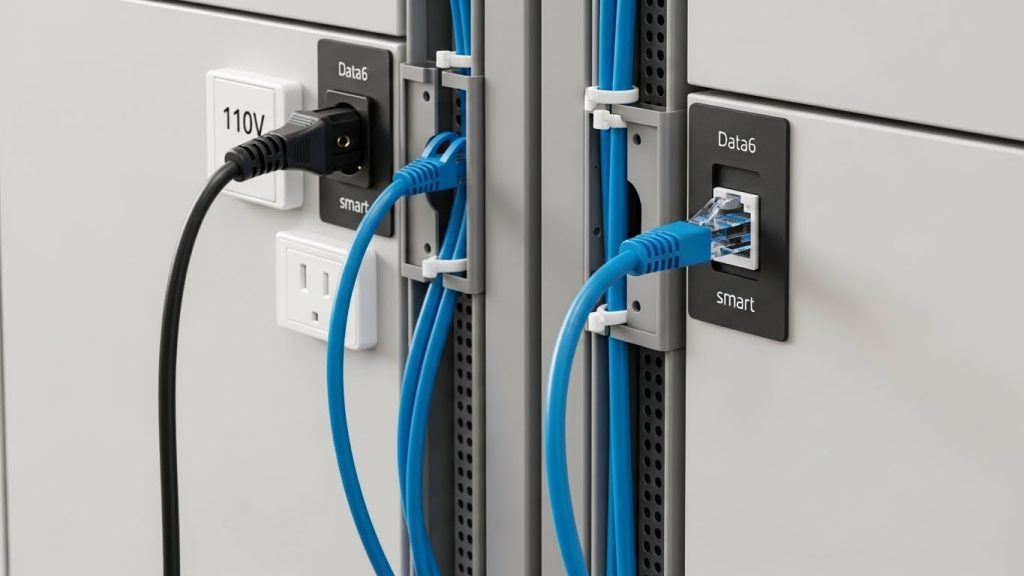
Internet connectivity is only necessary if you want "Smart" functionality. An offline electronic locker can still function perfectly using local RFID cards or PIN codes stored in the lock's local memory.
When you NEED internet:
- Remote Management: You need to reset PINs or open doors from a central computer.
- Audit Trails: You need a digital log of exactly who opened which locker and at what time.
- App Integration: Users unlock the units via a smartphone app.
Wi-Fi vs. Ethernet:
- Wi-Fi: Easier to install but can be prone to interference in metal-heavy environments (like a locker room). In 2026, Wi-Fi 6E or 7 is recommended for high-density device environments.
- Ethernet (PoE): Some modern smart lockers use Power over Ethernet (PoE), which provides both power and data through a single cable, significantly simplifying the "wire mess" behind the unit.
Infrastructure & Installation: What Managers Often Miss
The physical size of the unit impacts where you can pull power. Before ordering, check what sizes cell phone lockers come in to ensure the unit won't block existing wall outlets or data ports.
The "Retrofit" Scenario:
If you are adding lockers to an existing building, drilling into concrete or pulling new wires through finished walls can cost more than the lockers themselves. In these cases, battery-operated locks or standalone mechanical units are usually the better financial choice.
Checklist for Smart Locker Readiness:
- Proximity: Is the locker within 6 feet of a dedicated outlet?
- Signal Strength: If using Wi-Fi, does the install site have at least -60 dBm signal strength?
- Clearance: Is there enough space behind the unit for cable management and ventilation?
FAQ
Yes, almost all professional-grade electronic lockers include a physical master key or a master code to open doors in the event of a power failure or forgotten PIN.
A single charging locker typically uses very little power at idle, but a bank of 40 phones charging simultaneously can draw 500–1,000 watts (needs verification) depending on the charging speed.
Most smart lockers are designed with "local cache" memory, meaning they will still recognize authorized RFID cards or existing PIN codes even if the building’s Wi-Fi goes down.
For locking only, you can use battery-powered units. For charging, you must have a hardwired connection, as solar or external power banks are currently inefficient for high-density phone charging.
Wi-Fi lockers connect wirelessly to your network, while Ethernet lockers require a physical data cable. Ethernet is generally more stable and secure for high-security environments.
Most modern smart lockers are cloud-managed, meaning you do not need a local server. You simply need a stable internet connection to access the manufacturer's management dashboard.
Conclusion
The decision to use power or internet depends on whether you view your lockers as a simple storage bin or a piece of managed infrastructure. If you want a "set it and forget it" solution, mechanical or battery-operated lockers are best. If you want to provide a service (charging) or maintain strict security logs, you must invest in power and data connectivity.
