
What Maintenance Do Charging Phone Lockers Require?
To keep charging phone lockers functional and safe, you must perform regular hardware inspections, software updates, and sanitization protocols. While high-quality steel lockers are built for durability, the electronic components—specifically charging cables and power modules—require a consistent preventative maintenance schedule to prevent downtime and electrical hazards.
By following a structured upkeep plan, you can control:
- User Safety: Preventing cable fraying and port overheating.
- Device Longevity: Extending the 5–10 year lifespan of the unit.
- Connectivity: Ensuring RFID and app-based locks remain responsive.
- Uptime: Eliminating "out of order" bays that frustrate users.
Hardware Maintenance: The High-Wear Components
The most frequent maintenance tasks for cell phone lockers involve the "consumable" parts: the charging cables and the locking mechanisms. Because these components are handled by hundreds of different users, they experience the highest rate of mechanical fatigue.
Cables and Ports
In high-traffic environments like gyms or transit hubs, charging cables are the first to fail. Inspect the lightning, USB-C, and Micro-USB connectors for "port wiggle" or bent pins. If a cable requires force to connect or disconnect, it should be replaced immediately. Using reinforced, braided cables can reduce replacement frequency by up to 40% (needs verification).
Mechanical Hinges and Doors
Heavy-duty steel doors are resilient, but the hinges can accumulate dust or become misaligned over time. A misaligned door prevents the electronic lock from engaging properly, which can lead to security breaches.
Common Maintenance Mistakes:
- Using WD-40 on Locks: Standard lubricants attract dust. Use a dry graphite-based lubricant for mechanical lock cylinders.
- Ignoring Frayed Insulation: Even a small tear in a cable’s plastic jacket is a fire risk for lithium-ion batteries.
The 3-Tier Preventative Maintenance Schedule
Effective facility management relies on a tiered approach to maintenance. This ensures that hygiene is addressed daily while technical audits happen on a quarterly cycle.
Daily: Hygiene and Surface Inspection
In 2026, user expectations for cleanliness are high. Daily maintenance should focus on:
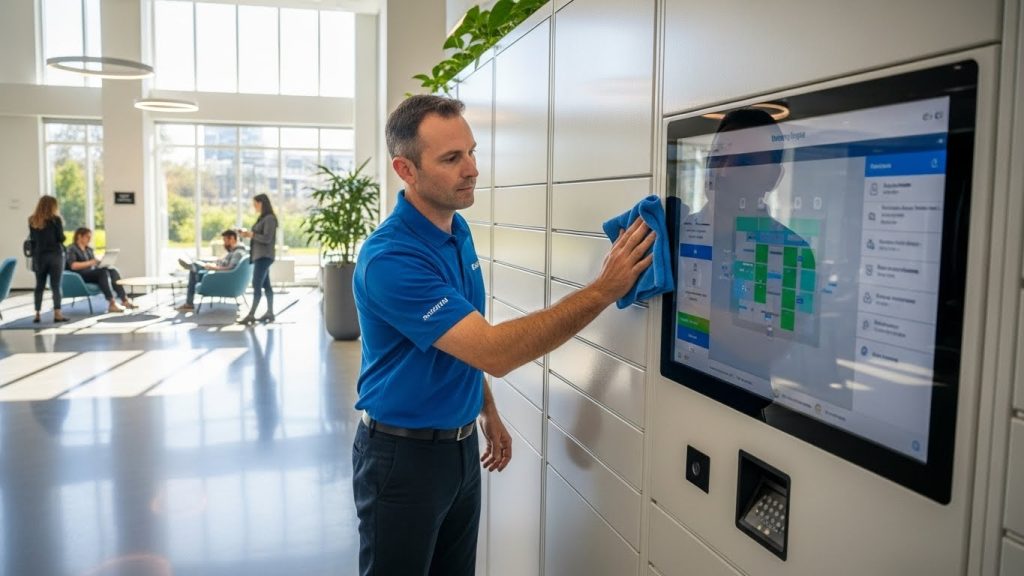
- Touchscreen Sanitization: Wipe down kiosks and screens using a 70% isopropyl alcohol solution applied to a microfiber cloth.
- Visual Check: Walk the locker bank to identify any physically damaged doors or "Power Error" LED indicators.
Monthly: Cable & Mechanical Audit
Once a month, test every individual bay.
- Plug a test device into each cable to ensure consistent power delivery.
- Check for "ghosting" on touchscreens where certain areas become unresponsive.
- Tighten any loose mounting screws on the locker stand or wall brackets.
Quarterly: Electrical & Software Safety
Every three months, perform a deeper system check. This includes testing the Surge Protection Device (SPD) and ensuring all internal power supplies are clear of dust buildup, which can cause overheating. For organizations managing large fleets, this is also the ideal time to review your workplace phone policy to ensure the hardware still meets your security requirements.
Software & Connectivity Maintenance (For Smart Lockers)
Modern "smart" lockers rely on a backend management system. Maintenance here is digital but just as critical as physical upkeep.
- Firmware Updates: Manufacturers frequently release patches to improve charging efficiency and patch security vulnerabilities. Unpatched lockers are susceptible to "juice jacking" or unauthorized remote unlocking.
- RFID Calibration: If users report that their badges are taking multiple tries to scan, the RFID reader may need a sensitivity recalibration or a simple lens cleaning.
- System Log Review: Periodically clear the system's event logs. Excessive log data can slow down the local processor, leading to laggy touchscreen performance.
Sanitization & UV-C Bulb Replacement
Many advanced phone lockers now feature integrated UV-C disinfection to kill pathogens on device surfaces.
UV-C Bulb Lifecycle: Most commercial UV-C bulbs have an effective lifespan of approximately 9,000 hours. Even if the bulb still glows blue, its germicidal effectiveness drops significantly after this point. Plan to replace these bulbs annually to maintain sanitization standards.
When replacing bulbs, ensure the housing is free of dust. A layer of dust on a UV-C bulb can block up to 30% of its germicidal output. Maintaining these systems is vital for overall lithium battery safety, as it prevents heat-trapping debris from accumulating near the charging ports.
Troubleshooting Common Maintenance Issues
When a locker bay fails, follow this diagnostic sequence:
- "No Charge" Errors: Swap the cable first. 90% of charging issues are cable-related rather than port or PSU related.
- Jammed Electronic Locks: Check for physical obstructions (like a phone case caught in the door) before attempting a software override.
- Connectivity Drops: For Wi-Fi-enabled lockers, check for nearby interference or signal-blocking metal structures that may have been moved near the locker bank.
If your facility is struggling with high repair rates, it may be time to update your school locker policy to include "proper use" guidelines for students or staff, reducing accidental damage.
Frequently Asked Questions
In high-traffic commercial areas, cables should be replaced every 3 to 6 months. For lower-traffic offices, they can last up to 12 months with regular cleaning.
No, you should never spray liquids directly on the screen. Spray the cleaner onto a microfiber cloth first to prevent liquid from seeping into the internal electronics.
Most maintenance can be handled by on-site facility teams. However, an annual electrical audit by a certified technician is recommended to verify surge protection and ground-fault circuit interrupter (GFCI) integrity.
High-quality steel lockers typically last 10+ years. The internal electronics and charging modules usually have a functional lifespan of 5 to 7 years before an upgrade is recommended.
No, offline lockers with simple pin-code locks do not require software maintenance. Only "smart" lockers connected to a network require firmware and security updates
Most smart lockers include a "bulb life" timer in the management software. If your locker is not networked, replace the bulb once a year or every 9,000 hours of use.
Conclusion
Maintaining a charging phone locker is a balance between physical cleaning and technical auditing. By implementing a 3-tier maintenance schedule, you ensure your investment remains a secure, high-speed charging resource for your users.
