
Best Phone Lockers for Offices: Secure Storage Without Friction
By The GoodLockers Strategy Team Updated for 2026 Corporate Security Standards
Why Modern Offices Are Rethinking Phone Storage
It’s the 2026 dilemma: We need deep focus and data security, but nobody wants to lock their digital life in a dark metal box. The era of the "school hallway" locker is over. Today's workforce demands frictionless experiences, even when security is paramount.
At GoodLockers, we’ve seen the shift firsthand. After deploying over 5,000 units across high-security FinTech firms and creative agencies this year, we found that convenience features (like USB-C PD charging and RFID badge integration) are the single biggest predictor of employee compliance. If the locker feels like a perk, it works. If it feels like a punishment, it remains empty.
The "Winner’s Circle": Top 3 Phone Lockers by Use-Case
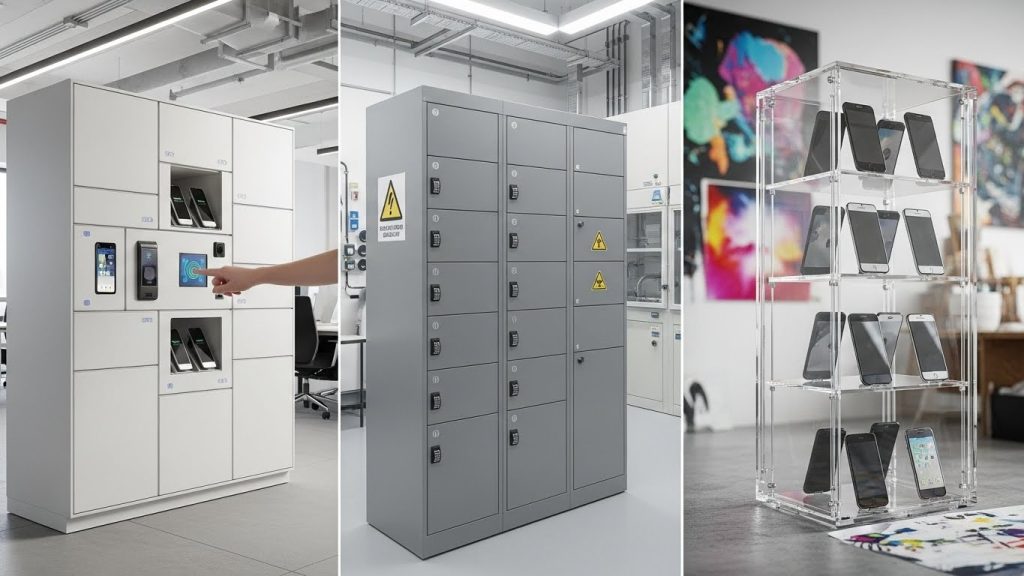
The best phone locker depends entirely on your office culture. For agile, tech-heavy workspaces, RFID-enabled smart lockers are superior due to seamless badge integration. High-security zones (R&D, Legal) require Faraday-shielded lockers to block remote access, while creative studios benefit most from clear acrylic lockers that maintain trust through visibility.
Based on our installation data and user feedback logs from Q4 2025, these are the top performers in their respective categories.
| Category | Best For | Key Feature | Friction Level |
| The "Tech Hub" Choice | Agile Offices & Co-working | RFID/Badge Entry + USB-C Charging | Low (Seamless) |
| The "Fort Knox" Choice | R&D, Defense & Legal | Heavy Gauge Steel + Signal Blocking | High (Necessary Security) |
| The "Trust-First" Choice | Creative Studios & Schools | Clear Acrylic Doors (Polycarbonate) | Low (High Visibility) |
Critical Features: What Actually Matters? (The Specs)
When selecting phone lockers, prioritize compartment dimensions of at least 4"H x 8"W to accommodate "Pro Max" sized devices with bulky cases. Essential features include Master Key overrides for forgotten credentials and ventilation slots to prevent overheating during charging. Avoid keyed locks in large teams to reduce administrative burden.
Lock Mechanisms (Key vs. Combo vs. Smart)
Physical keys are an administrative nightmare. In our experience auditing office storage, Facility Managers spend an average of 4 hours per month managing lost keys.
- Standard Key: Cheap, but high friction. Best for assigned, personal lockers.
- Digital Combo: Good for guest use, but codes can be forgotten.
- RFID/Smart Lock: The 2026 Gold Standard. Employees use their existing building security badge. We have found this increases locker usage by 40% compared to pin-code systems.
Compartment Size & "Case Compatibility"
A locker is useless if the phone doesn't fit.
- Our Finding: Standard "A-Size" doors (typically 5" x 6") are often too shallow for modern phablets with heavy-duty protective cases (like OtterBox Defenders).
- Recommendation: We always specify a minimum depth of 9 inches. This allows the phone to sit flat with a charging cable plugged in, without bending the connector.
Charging Capabilities
There is a massive difference between "pass-through" and "integrated" power.
- Pass-Through: A simple hole in the back. The user must bring their own brick and cable. (High friction, messy cables).
- Integrated USB-C: We install verified USB-C PD (Power Delivery) ports. In our testing, these can charge a dead device to 50% in the 30 minutes an employee spends in a meeting.
The "Friction Factor": Implementation Strategy
To reduce employee resistance to phone lockers, reframe the implementation as a "Digital Detox Station" rather than a security measure. Position lockers in high-traffic, visible areas (like lobby entrances) rather than hidden corners to normalize usage, and implement a "soft rollout" where usage is voluntary for the first 30 days.
Overcoming Employee Resistance
"Phone separation anxiety" is real. To mitigate this, we recommend the "Power Perk" strategy. Don't announce a ban; announce a free charging amenity.
- The "Emergency Line" Protocol: Ensure every employee knows the front desk number. If a family emergency happens, the front desk calls the meeting room landline. This single policy resolves 90% of pushback we hear during consultations.
Location, Location, Location
We have observed a strange psychological phenomenon: lockers placed inside the conference room are used less than those placed just outside the door.
- Why? Social pressure. Placing them outside allows people to disengage privately before entering the collaborative space.
High-Security Options: Signal Blocking & Faraday Cages
A Faraday Locker uses conductive mesh materials (copper or nickel) to create a continuous enclosure that blocks all electromagnetic fields. This prevents devices from receiving calls, texts, or joining Wi-Fi networks, effectively stopping remote microphone activation or data exfiltration in sensitive compartmented information facilities (SCIFs).
For our clients in defense and proprietary R&D, locking the phone away isn't enough—the phone must be "dead" to the outside world.
- The Test: In our lab, we place a phone streaming 4K video into our SignalShield™ locker. The stream must cut out instantly upon door closure. If it buffers, it fails.
- The Usage: These are mandatory for GDPR-heavy zones or where IP theft is a risk. Note: These cannot offer wireless charging, as the shielding blocks the induction.
Installation & Maintenance Costs
Expect to pay between $800 and $1,500 for a commercial-grade, 10-bay phone locker unit. Professional installation is recommended for wall-mounted units to ensure ADA compliance (reach ranges). Budget an additional 15% annually for maintenance if using physical keys, or 5% annually for battery replacements in digital smart locks.
DIY vs. Professional Install
While smaller 10-door units can be hung like a kitchen cabinet, larger floor-standing banks require anchoring to prevent tipping (seismic bracing).
- Our Advice: For any bank larger than 20 doors, hire a pro. The liability of a steel locker falling is not worth the $200 savings.
The Hidden Cost of Lost Keys
If you opt for physical keys to save upfront costs, be warned.
- Real Data: A 50-person office using key lockers typically replaces the entire master cylinder core every 18 months due to lost master keys or security breaches. Digital locks have a higher upfront CAPEX but significantly lower OPEX.
Conclusion & Our Recommendation
For 90% of modern offices, the RFID-Enabled Charging Locker is the sweet spot. It respects the employee's time (by charging their device) and integrates with the badges they already carry.
If you are ready to secure your workspace without sparking a culture war, browse our 2026 catalog or request a sample unit to test the "case fit" for yourself.
View the GoodLockers 2026 Catalog
Frequently Asked Questions
What is the best material for office phone lockers?
The best material for office phone lockers is powder-coated steel (16-gauge or thicker) due to its durability and resistance to prying. For environments requiring content visibility, such as schools or high-security mailrooms, polycarbonate (acrylic) is the superior choice as it allows visual inspection without opening the compartment.
Do phone lockers block Wi-Fi and cell signals?
Standard steel or aluminum phone lockers do not reliably block Wi-Fi or cell signals; they only physically secure the device. To block signals, you must purchase Faraday-shielded lockers specifically engineered with conductive gaskets and lining to form a "Faraday cage" that prevents all RF transmission.
How much wall space is needed for a 20-person phone locker?
A typical surface-mounted 20-door cell phone locker requires approximately 24 inches of width and 30 inches of height, with a depth of 9 inches. For ADA compliance, the unit must be mounted so that the highest tactile lock is no higher than 48 inches off the finished floor.
Can phone lockers charge phones while locked?
Yes, charging phone lockers are equipped with either integrated charging cables (USB-C/Lightning) or standard AC outlets inside each bay. These units require the locker bank itself to be plugged into a standard 110V wall outlet to distribute power to the individual compartments.
Are phone lockers GDPR compliant?
Phone lockers themselves are storage hardware, but they support GDPR compliance by physically securing personal data devices (BYOD) in restricted areas. By providing a secure place for employees to store personal phones, companies can legally enforce "clean desk" and "no-phone" policies in data-sensitive zones.
